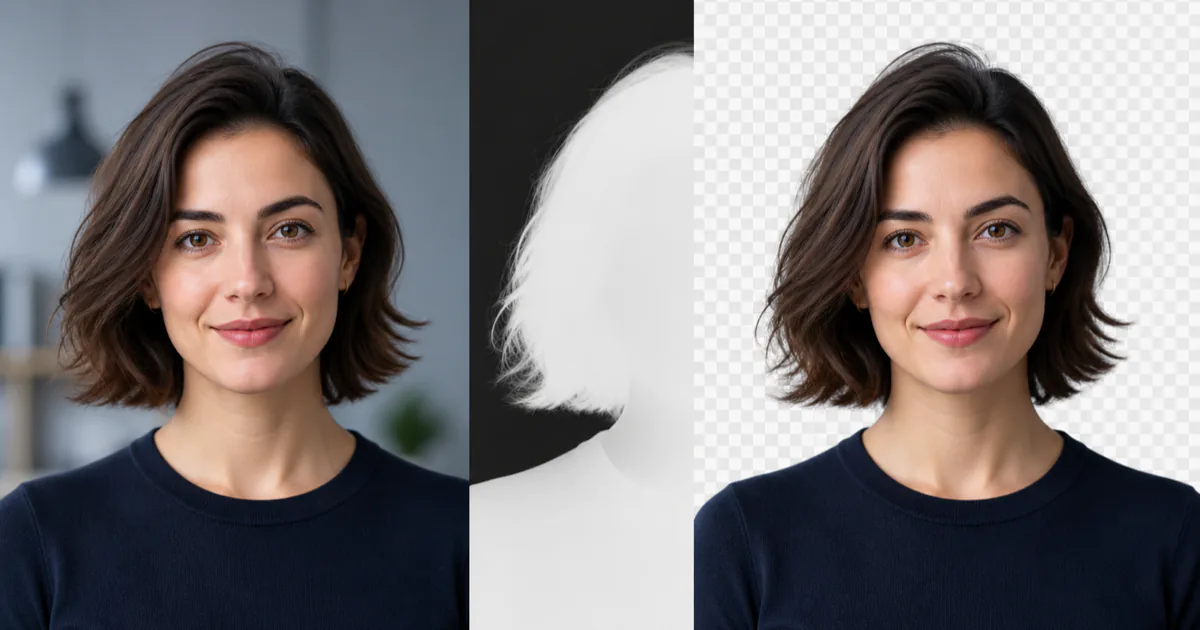
Browser portrait background removal can run without an image upload. The page downloads a segmentation runtime and model, decodes the selected photo locally, predicts a person mask, and combines that mask with the original pixels in a canvas. The final transparent PNG is created in the same browser tab.
This architecture is useful when a tool has a focused subject, such as a portrait, and the user values privacy or does not want to create an account. It also removes the need for an image-processing API and its associated credentials. It does not make every background-removal problem easy, and it is important to describe that boundary honestly.
What local processing actually means
The phrase "runs in the browser" describes where inference and compositing happen. It does not mean the page contains no downloaded code. Before the first image can be processed, the browser still needs the JavaScript application, a WebAssembly runtime, and a machine-learning model. Wisly serves those assets from its own domain. Once they are loaded, the selected image is passed to local browser APIs rather than to an upload endpoint.
That distinction matters for privacy claims. A trustworthy local tool should be able to explain its data flow in plain terms:
- The user selects a file from the device.
- The browser decodes it into pixels.
- The segmentation model reads those pixels in memory.
- Canvas code applies the resulting mask.
- The browser creates a downloadable PNG blob.
No API key is required because there is no remote inference request. The file name, image bytes, and output do not need to enter a server-side form or database.
Local is also not identical to offline. A first visit requires a network connection to load the page assets. A later visit may benefit from the browser cache, but reliable offline use would require an explicit offline application strategy, normally including a service worker and cache versioning. It is better to say "local processing" than to promise offline behavior that has not been implemented.
A portrait becomes a confidence mask
Wisly uses the MediaPipe Selfie Segmentation model through the Image Segmenter task. Google documents the square model as a float16 model with a 256 by 256 input. It produces two semantic categories: background at index 0 and person at index 1. The model card lists the model itself at roughly 249 KB, although the complete browser runtime is larger than the model file.
The useful output is not a cut-out image. It is a confidence mask. Each mask value represents how strongly a model associates one position with the person category. Values near 1 are strong foreground predictions, and values near 0 are strong background predictions. Intermediate values tend to appear around hair, shoulders, semi-transparent material, motion blur, and uncertain boundaries.
The page converts that confidence into alpha transparency. Conceptually, the operation is:
output alpha = smooth threshold(person confidence)
output color = original portrait color
A hard threshold produces a crisp edge but can make hair look clipped. A wider transition preserves a softer boundary but may retain a halo from the original background. The edge-softness control changes this conversion step. It does not run the model again, so the preview can update immediately after inference has finished.
Canvas creates the final file
After the mask is ready, the tool draws the original image to a canvas at the chosen output size. It scales the small model mask to the canvas dimensions and uses the mask as an alpha channel. Transparent pixels remain empty. If the user selects white or a custom color, the page first fills the canvas with that color and then draws the masked person above it.
PNG is the default download format because it supports an alpha channel. A JPEG cannot preserve transparent pixels. WebP can support transparency, but PNG is a predictable choice for profile images, slide decks, thumbnails, and further editing.
Large source images create a separate engineering problem. A high-resolution photo can occupy much more memory after decoding than its compressed file size suggests. Four color channels at full resolution, plus source, mask, foreground, and output canvases, can multiply memory use. Wisly limits the upload size and scales extremely large dimensions to 4096 pixels. The interface reports that resize instead of silently implying that every output retains the camera's full resolution.
Why the tool is for portraits
Model choice defines the promise of the page. The Selfie Segmenter was trained to separate prominent people from their surroundings. It is not a general product-cutout model, and calling it one would create misleading expectations.
The official model card identifies several practical limitations:
- Thin features such as fingers can disappear from the mask.
- Poor light, visual noise, fast motion, and large occluders reduce quality.
- A person far from the camera is outside the intended use.
- Several people at different scales are a difficult case.
- The model is optimized for responsive use and may not produce pixel-perfect boundaries.
Portraits with clear subject separation, reasonable lighting, and a person occupying a substantial part of the frame work best. Busy backgrounds with colors close to hair or clothing are harder. Fine flyaway hair may need a dedicated matting model or a manual refinement tool.
These limits also explain why a confidence control is useful but not magical. It can tune an uncertain edge. It cannot recover a hand that the model never classified as foreground.
Performance is more than inference time
The model is intentionally lightweight and Google publishes task benchmarks for reference devices. Those numbers are not a promise for a complete web tool. A user's wait includes downloading and compiling WebAssembly, loading the model, decoding the image, resizing pixels, running inference, building the mask, compositing canvases, and encoding the PNG.
The first run is usually slower because the runtime and model have not been cached. Later runs in the same session reuse the initialized segmenter. Device memory, browser implementation, image dimensions, and power-saving settings can all change the result. A useful interface therefore shows distinct loading and processing states rather than claiming one universal number.
Google's web guide also notes that Image Segmenter calls are synchronous and can block the interface thread. For occasional still images, a short, explicit processing state can be acceptable. Continuous video or batch processing should move segmentation to a worker so repeated inference does not make the interface unresponsive.
Privacy and licensing belong in the design
Client-side processing reduces exposure because the selected photo does not need to be transmitted for inference. It does not excuse careless code. A site should self-host known runtime assets where practical, restrict network destinations with a Content Security Policy, avoid logging file details, and never place tokens in client code.
Dependency licensing is another part of the technical design. "Free to try" does not automatically mean "safe to embed in any closed-source website." Wisly uses MediaPipe Tasks Vision and the Selfie Segmentation model under Apache License 2.0, and includes the applicable license and attribution files with the deployed assets.
Try the complete local workflow
The free portrait background remover implements the flow described here. Choose a JPEG, PNG, or WebP portrait, wait for local segmentation, adjust the boundary, select a transparent or colored background, and download the PNG. For the clearest result, begin with a well-lit portrait in which the person is close to the camera and visually distinct from the background.
The important lesson is broader than one tool. Browser machine learning works best when the page makes a narrow promise, chooses a model trained for that promise, explains what is downloaded, and treats privacy, performance, and licensing as product behavior rather than footnotes.